AR tracing app that teaches pencil-on-paper drawing
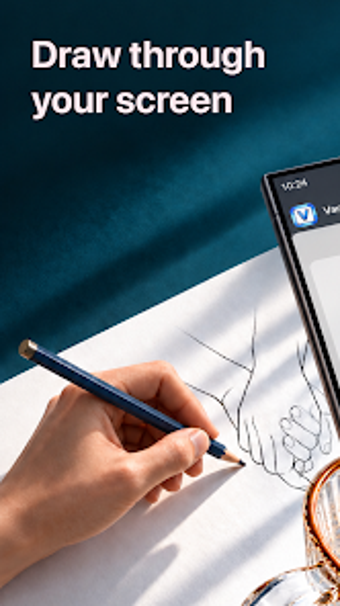
VanDraw, developed by VanDraw, is an Android augmented reality app that helps users learn pencil-on-paper drawing through camera-guided overlays. The app projects traceable images onto physical paper, converts photos into sketch templates, and offers adjustable transparency, size, and rotation controls. Designed for beginners, students, and hobbyists, it removes the need for tablets or lightboxes and supports muscle-memory practice with simple household setup.
How effective is it for beginners learning proportions and placement?
The app uses an AR overlay that projects a virtual sketch onto a real sheet of paper via the rear camera, so learners follow on-screen lines while drawing with a pencil. That camera-guided tracing directly addresses placement and proportion problems by showing exact line positions, which helps users focus on hand movement and muscle memory rather than measuring or freehand guesswork.
Can it turn personal photos into traceable templates?
VanDraw includes a photo-to-sketch conversion tool that produces clean outlines from personal images, enabling students to trace portraits or pet photos rather than relying solely on curated templates. The conversion feature supports learning by letting users practice with familiar subjects, and adjustable overlay settings let them control transparency, size, and rotation to match the paper and desired difficulty.
Is it suitable for classroom or solo practice sessions?
The app targets beginners, students, and hobbyists and requires only a smartphone, plain paper, and a pencil, so it fits informal classroom exercises and independent study. A tripod or stand is recommended to keep the phone steady while tracing, and flashlight support helps low-light sessions. Teachers can assign tracing practice without specialized hardware because the app substitutes for lightboxes and tablets.
How well does it support continued skill development?
The developer emphasizes muscle-memory building through real-world pencil-on-paper practice rather than producing finished digital art. With an extensive library of templates spanning animals, faces, florals, and lettering, learners can progress from simple outlines to more complex subjects. Adjustable overlay controls let users gradually reduce dependence on the guide by lowering transparency or resizing templates for recurring practice.
Clear suitability for beginners who want hands-on drawing practice
VanDraw is a practical learning aid for those who need visual placement and proportion help without buying drawing hardware. It supports repeated, real-world tracing to build pencil control and muscle memory. A notable limitation is its dependency on a functioning rear camera and a steady phone setup, which educators should plan for when using it in group lessons.